The intake call
Answer capacity questions while the caller is still on the phone.
The search needs nothing but the request itself: a date range, the daily time window, the weekdays, and the care that is needed. No client record, no service order, no setup. If the client already exists, picking them fills in their care needs for you.
- Each caregiver shows an availability percentage: how much of the requested schedule they can genuinely cover, after their existing shifts, absences and weekly unavailability are counted.
- Care needs can be scored softly, or marked must-have so only fully qualified caregivers appear.
- A 60% and a complementary 40% on the same list is how a heavy case gets split across two caregivers with confidence.
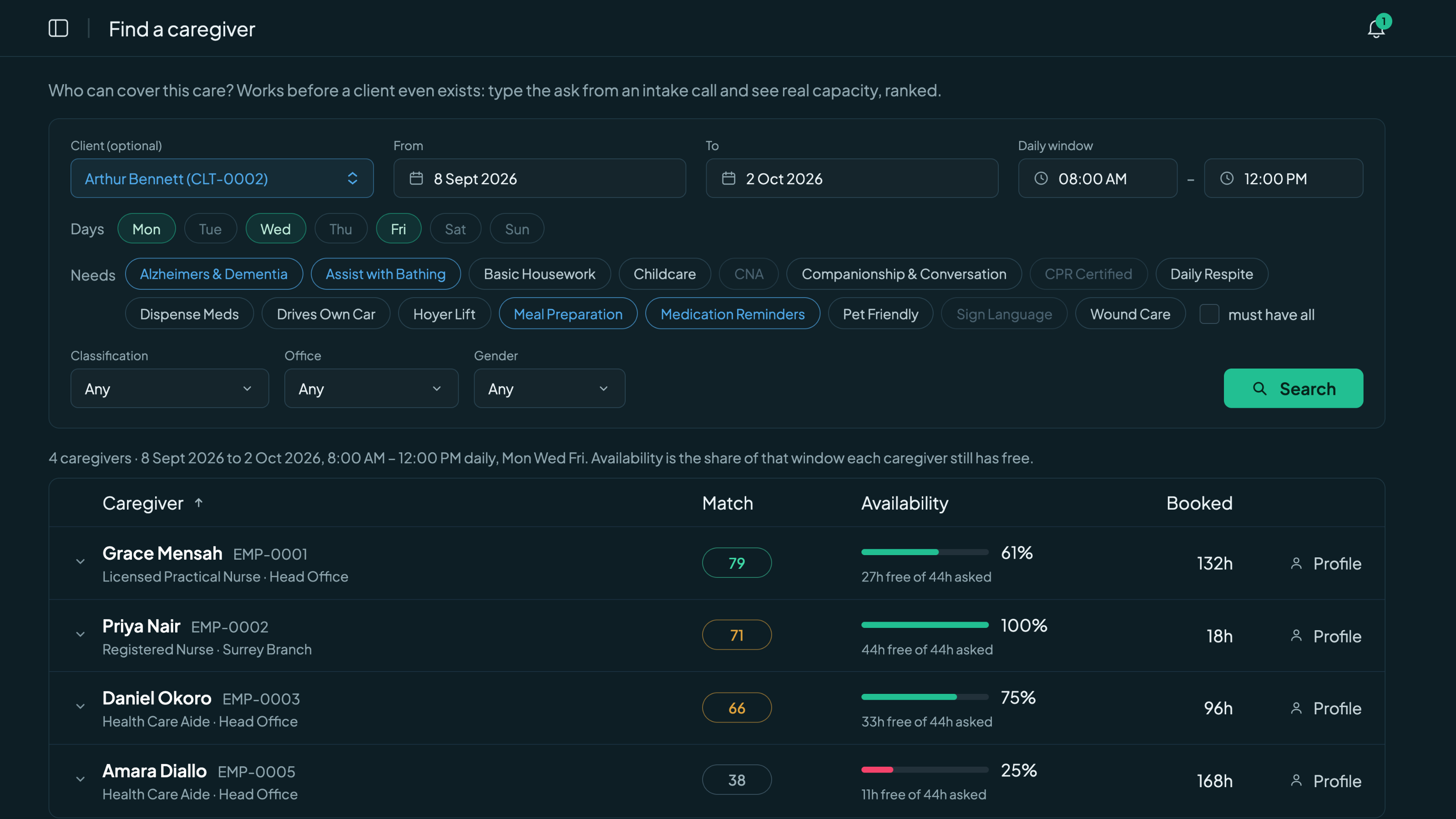
Dates, times, needs in; a ranked answer out. Click to enlarge.
No black box
Every rank comes with its reasons.
Expand any row and read exactly why it sits where it sits: which of the client's needs this caregiver covers and which are missing, how many visits they have already completed with this client, whether the family prefers them, and whether region and office line up. Current booked hours are shown right beside the score but never counted in it, because balancing workload fairly is a judgement your scheduler should make, not a formula.
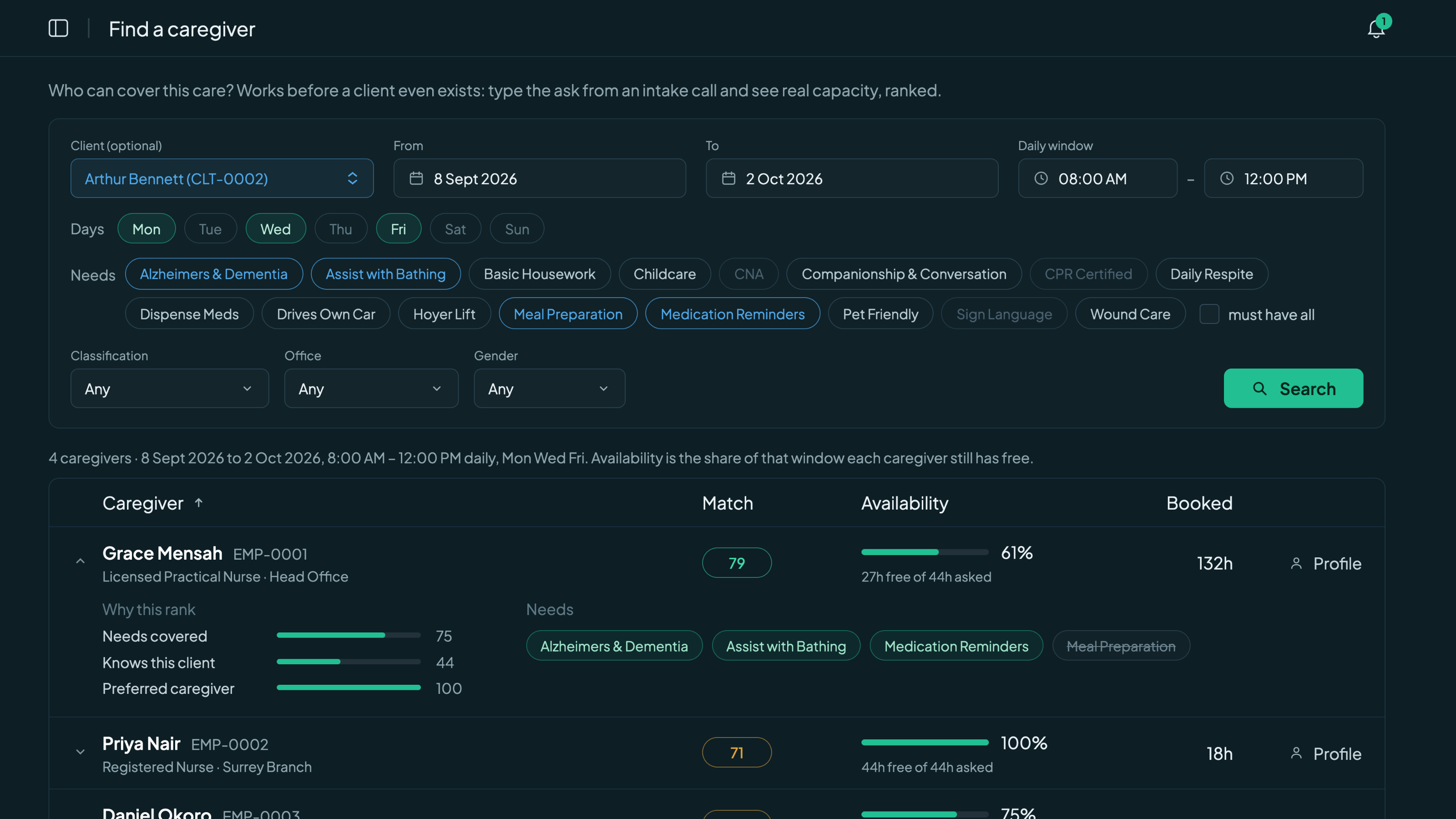
The breakdown behind one caregiver's rank. Click to enlarge.
One set of rules
If the search offers someone, you can actually book them.
The search applies the same rules the roster itself enforces: client exclusions, absences, and double-bookings. A caregiver who cannot take the work shows as blocked, with the reason written out instead of being quietly hidden. There is no gap between what the search promises and what assignment allows.
- The same ranking appears inside shift assignment, so picking a caregiver for one Tuesday visit gets the same intelligence as planning a whole month.
- Overnight shifts and overnight care windows are handled correctly, not rounded away.
- Shifts frozen by a service interruption count as free time, so a paused case never blocks a caregiver from new work.
Common caregiver search questions.
No. It ranks your caregivers and shows the reasons behind every rank; your coordinator still makes the call. The same ranking appears when assigning a single shift, so the informed choice is also the fast one.
Yes. The Find a caregiver page needs only dates, times, weekdays and the care needs, so you can answer an intake call before creating any client or service order. If the client already exists, picking them pre-fills their care needs.
It answers one question: how much of what you asked for can this person actually cover? Existing shifts, absences and weekly unavailability are all subtracted from the requested window, day by day. 100% means the whole request fits; 50% means half of it does, which is often how a case gets split across two caregivers.
Because the search applies the same rules as assignment itself: client exclusions, absences and double-bookings. Blocked caregivers are listed with the reason rather than silently hidden, so you always know why someone is not an option.
The next intake call deserves a real answer.
Start your 30-day free trialNo credit card to start · Cancel anytime