Recurring schedules
Set the pattern once. The shifts follow.
Every client gets service orders that carry the real-world details: service type, payor, authorization number, authorized hours, and the billing and pay rates that go with them. On top of an order, you set the visit pattern: weekly, alternating fortnights, monthly, or one-off visits, each with its own times.
- Shifts are created as soon as a schedule is added or changed. There is no overnight wait and no button to remember.
- Overnight shifts are native: 10 PM to 10 AM is one shift, midnight-aware everywhere, with a clear next-day marker.
- Monthly patterns survive short months: a visit set for the 31st lands on the month's last day instead of silently vanishing.
- Shortening an order shows exactly how many shifts would be cancelled before anything happens.
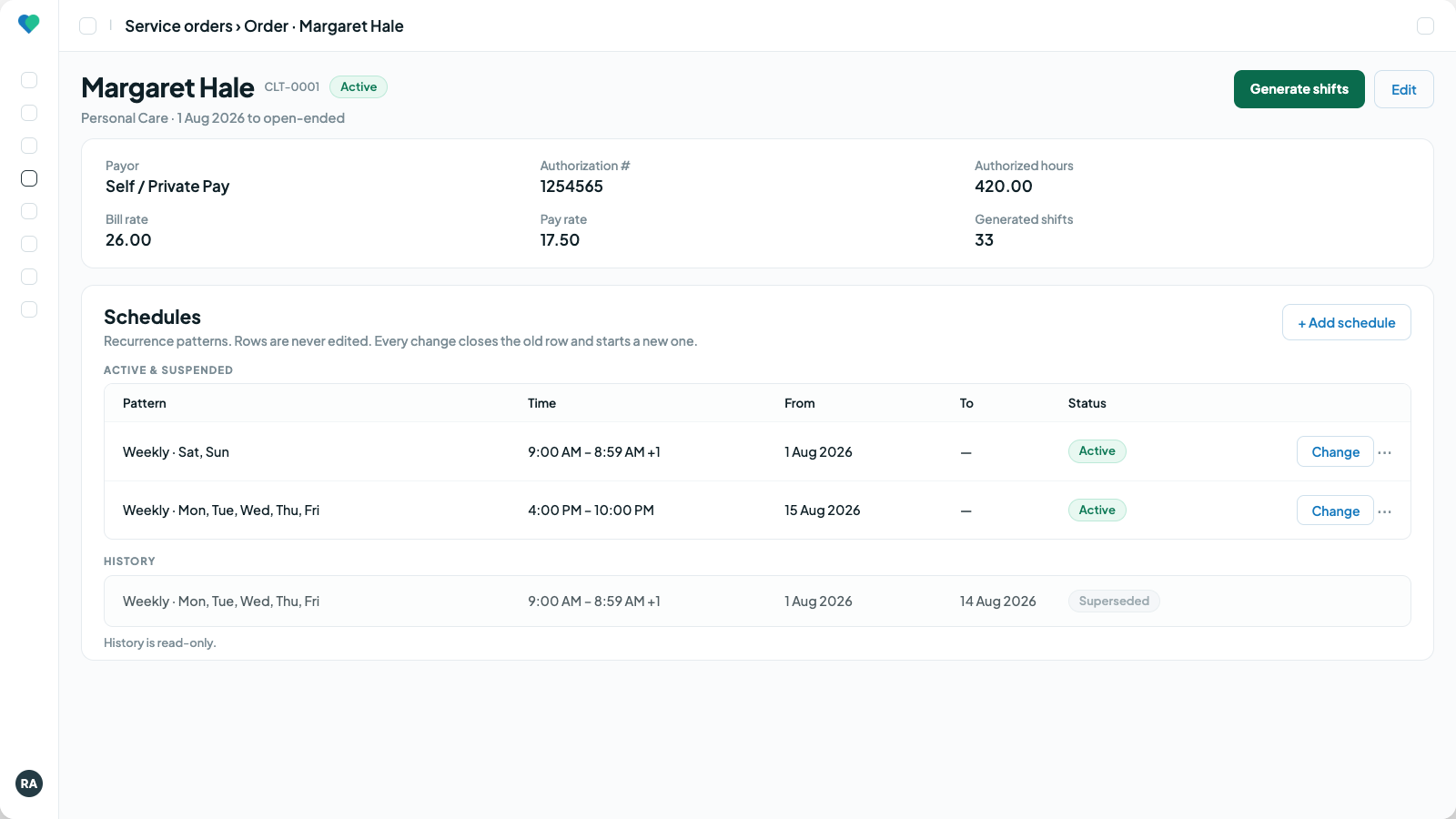
A service order and its patterns: the schedule's single source of truth. Click to enlarge.
The Schedule page
One page for every shift, three ways to look at it.
List, Calendar and By caregiver all sit on the same page, each in Day, Week or Month, and the week starts on the day your agency chooses. Four summary cards count the unfilled, conflicting, missed and assigned shifts for the dates in view. Click a card and the view filters to exactly those shifts.
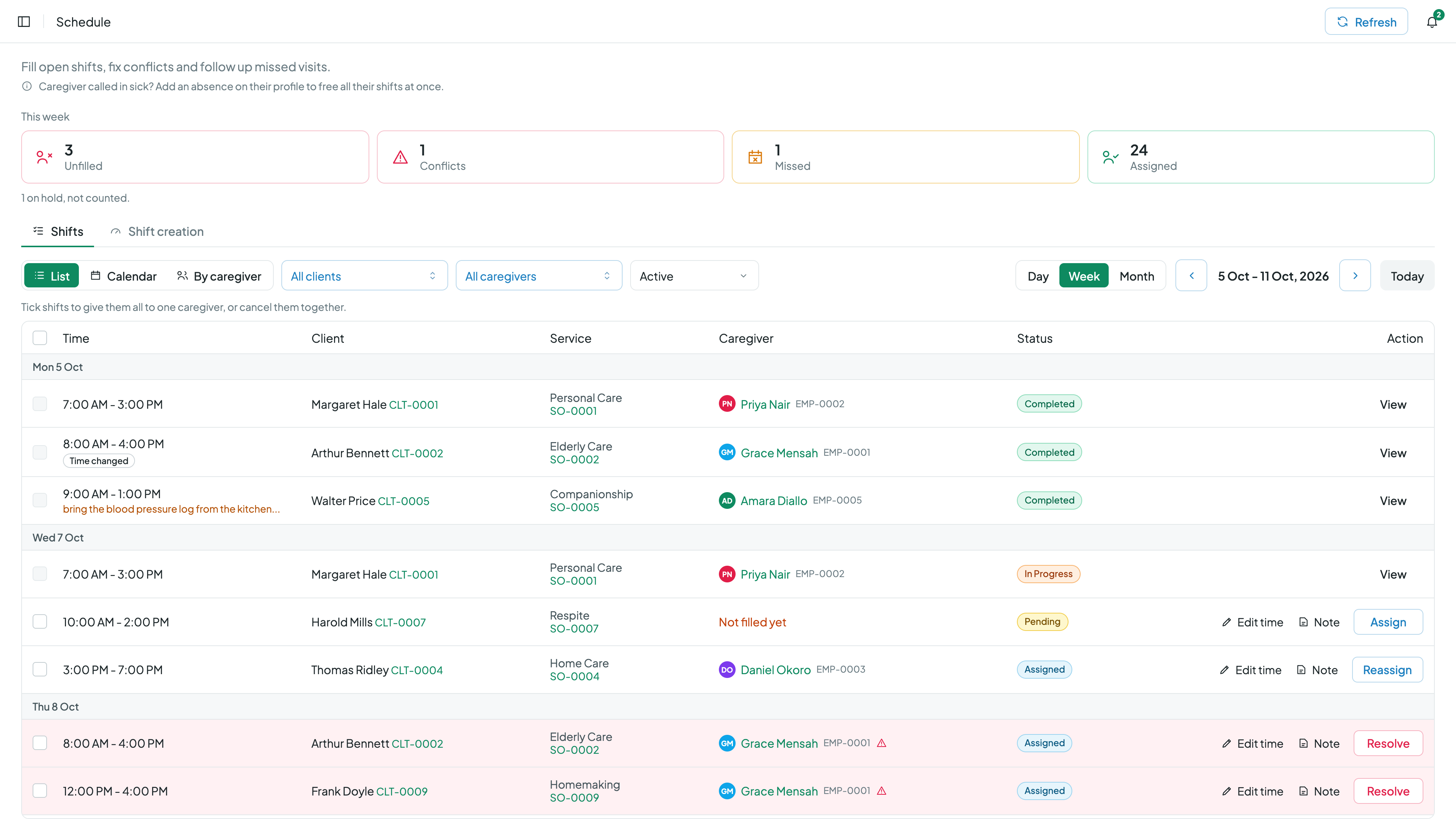
The Schedule page in List view: the week's counts on top, every shift below. Click to enlarge.
List
The work queue. Select shifts to assign or cancel them together, and fix a single shift from its own row.
Calendar
Week and month with real shift cards, so you can read the time, client and caregiver without opening anything.
By caregiver
Every caregiver as a row with their booked hours, plus a row for open shifts that are not filled yet.
Filter any view by client, caregiver or status. Active shifts show by default, and you can switch to Unfilled, Conflict, In progress, Completed, Missed, Cancelled, On hold or Replaced.
List view
Fill and fix shifts without leaving the list.
- Tick several shifts and assign them all to one caregiver, or cancel them together. Cancelling always asks first.
- Change the time of one shift for that day only. The recurring schedule stays as it is and the caregiver is told about the new time.
- Add visit instructions or notes to a shift, and the caregiver sees them with the visit.
- If a visit happened but nobody clocked in, record it on the missed shift. Conflicts open and resolve from the same row.
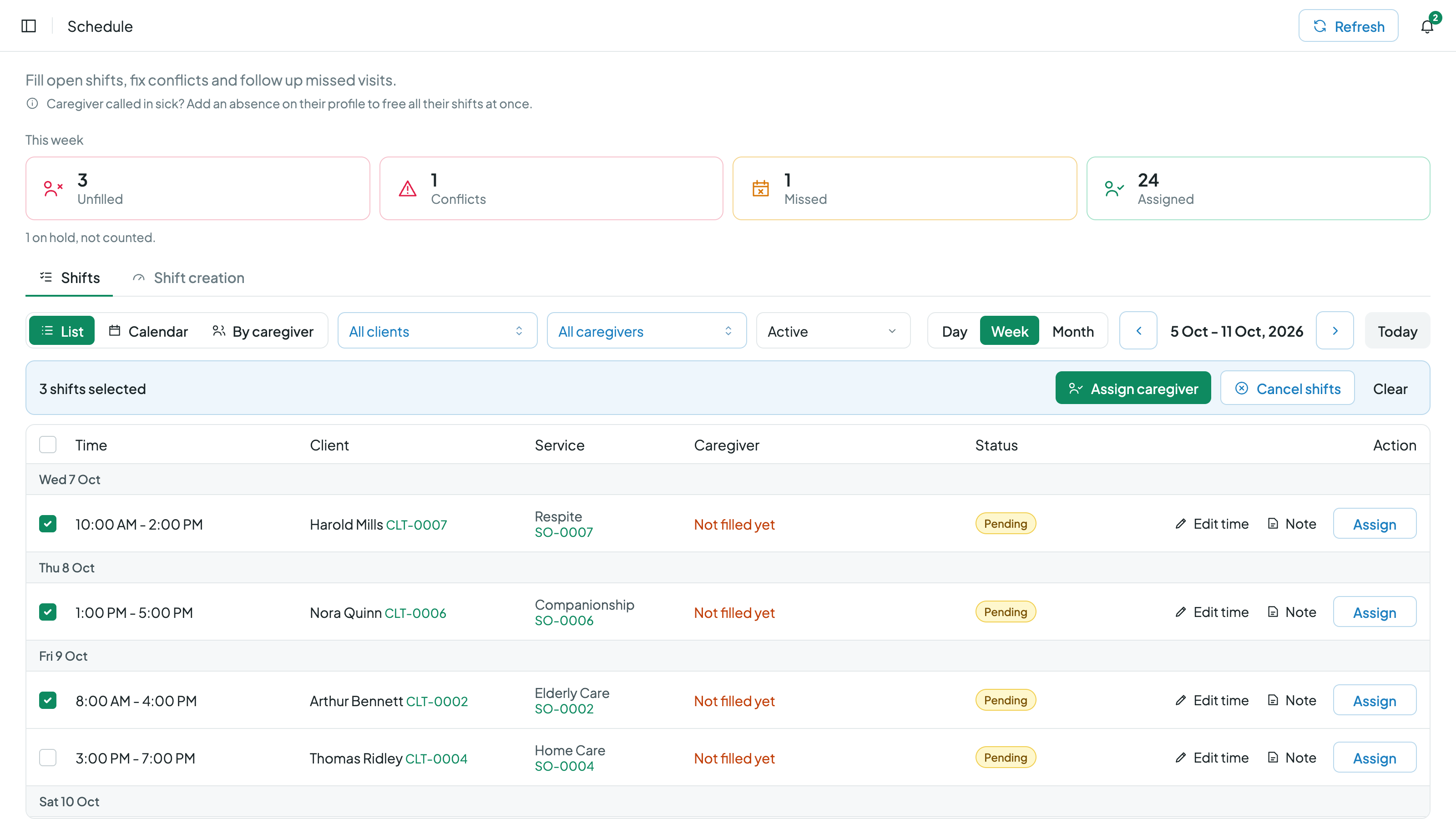
Several open shifts ticked and ready to go to one caregiver. Click to enlarge.
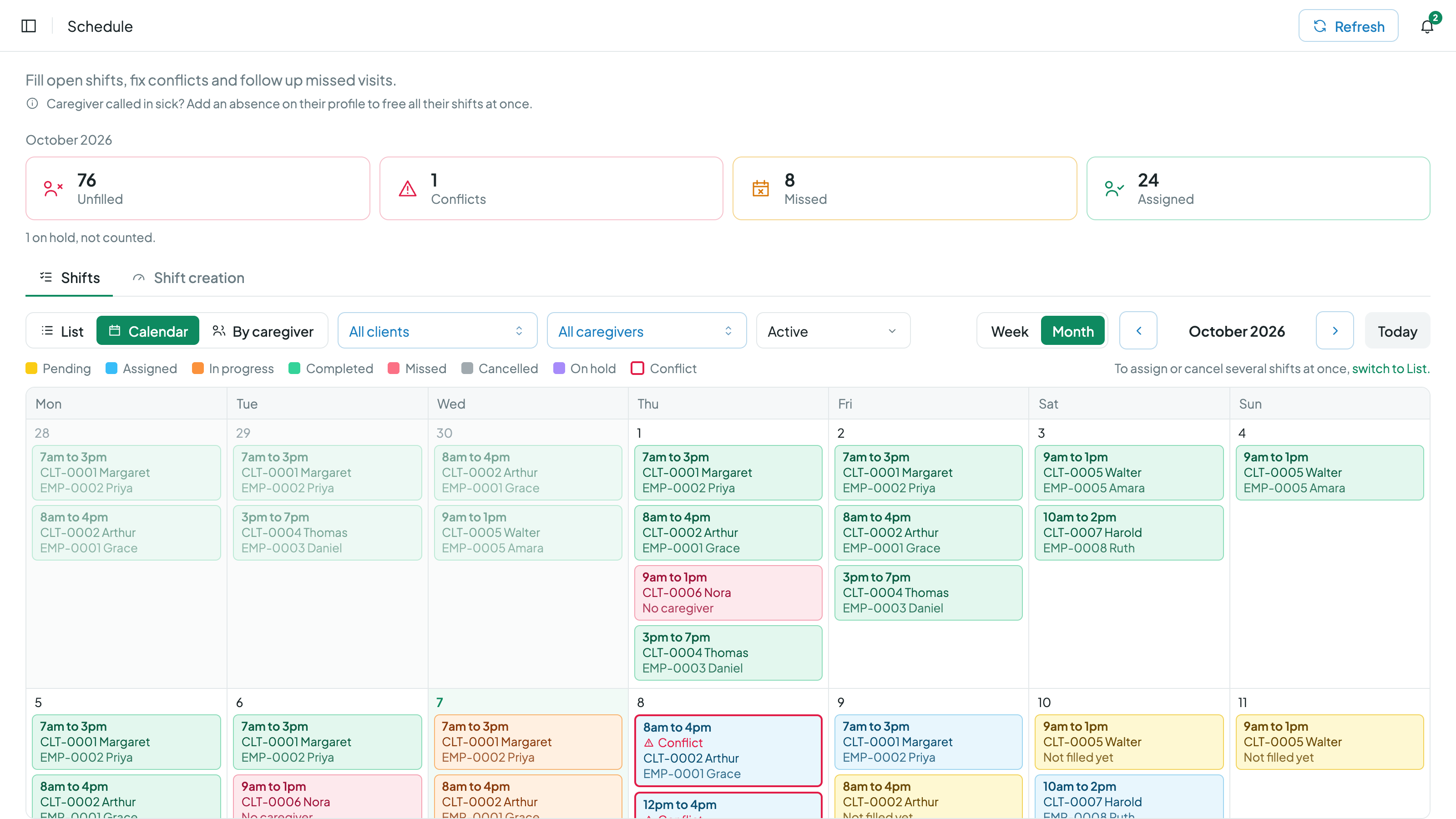
Month view with real shift cards, a double booking in red and a held visit in dashed violet. Click to enlarge.
Calendar view
A calendar that shows the actual shifts.
Week and month both show a card for every shift with its time, client number and caregiver number, coloured by status. A busy day shows "+N more", and clicking it opens the rest of the day in place instead of sending you to another screen.
Click any shift to open it: assign a caregiver, offer it as an open shift, change its time or resolve a conflict from there.
By caregiver
See every caregiver's week, and their hours, side by side.
Caregiver scheduling is easier when you can see who has room. Every caregiver gets a row with an hours column for the week or month in view, and a "Not filled yet" row at the top holds the open shifts that still need someone.
- Month scrolls sideways and opens on the current week, so the dates you care about are already on screen.
- Day is a timeline per caregiver with a line for the current time, and overnight and live-in shifts running past midnight into the next morning.
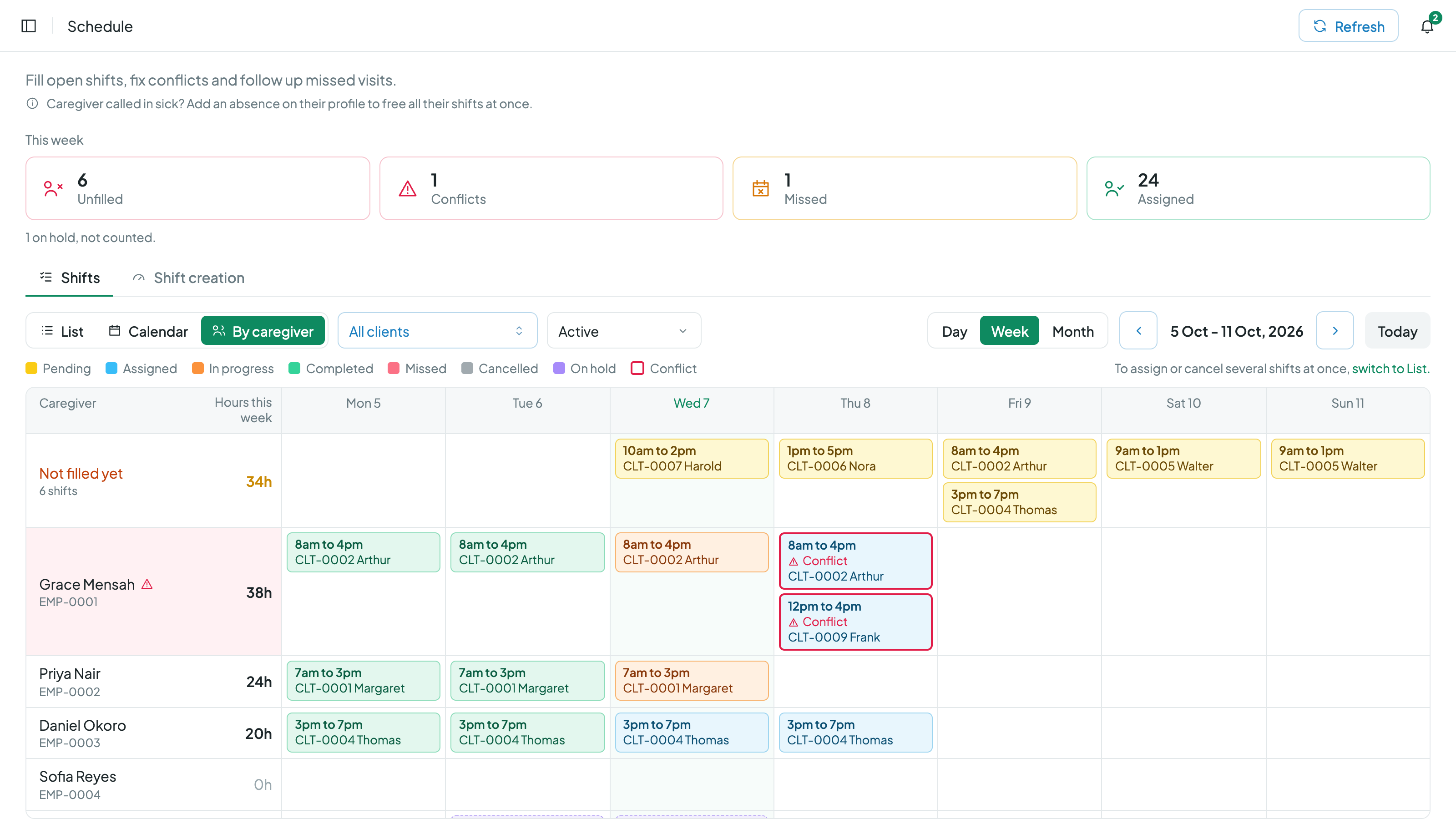
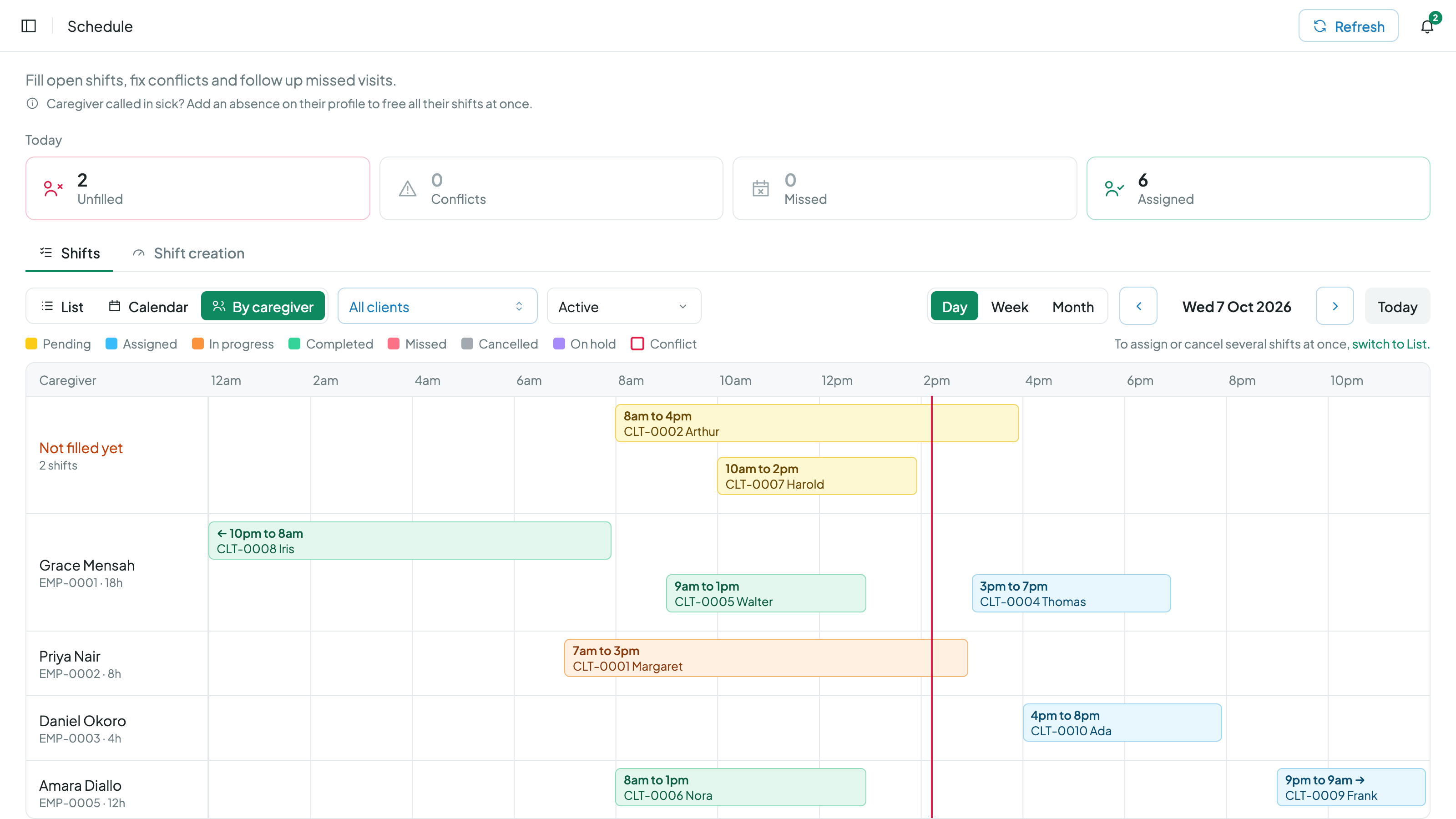
The week with hours per caregiver, and the day as a timeline. Click to enlarge.
Conflicts and holds
Problems look the same in every view.
Double bookings in red
A shift that overlaps another for the same caregiver gets a red outline in the list, the calendar and the caregiver rows. Click it and it opens ready to resolve. Once the overlap is fixed, the conflict clears itself.
On hold in dashed violet
When a client's service is interrupted or a schedule is paused, the shifts in that window stay visible as dashed violet cards. They are not counted as work and never turn into missed visits.
One set of colours
Pending is yellow, assigned blue, in progress orange, completed green, missed red, cancelled grey and on hold violet, on every screen, so nobody has to check a legend twice.
Visits that nobody clocked into are caught around the clock as well. That side lives on the missed visit alerts page.
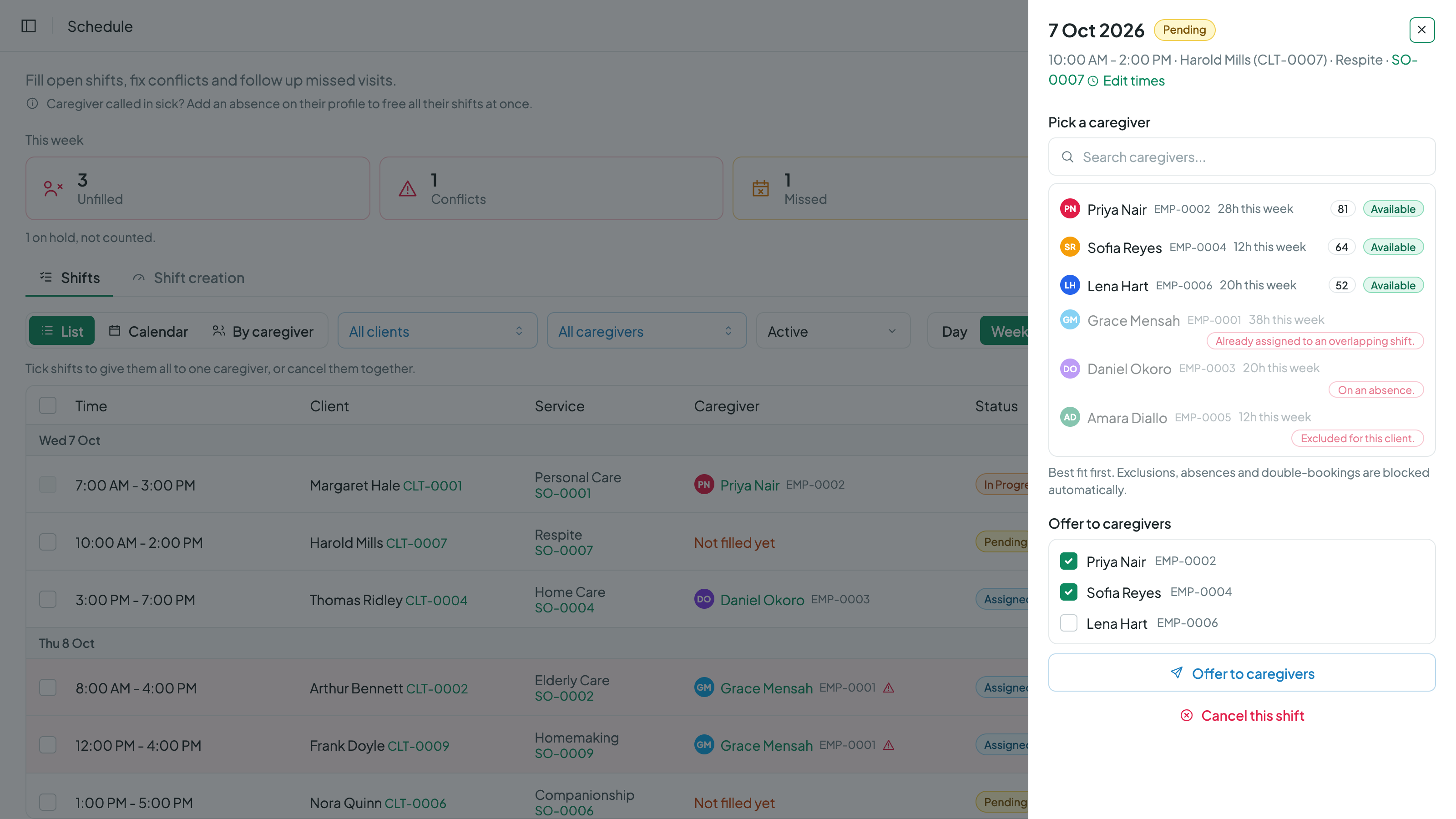
The shift drawer: the best fit first, and the reason next to anyone who can't take it. Click to enlarge.
Assignment
The wrong assignment is hard to make.
- Open a shift and caregivers are ranked by how well they fit the client and how much of the visit they are free for.
- Caregivers who can't take it stay on the list with the reason: already booked, on an absence, or excluded by the client.
- Offer an open shift to several caregivers at once. The first to accept gets it and the other offers withdraw themselves.
- Every assign and unassign is recorded with a reason, building a complete who-worked-when history that nothing can rewrite.
The same ranking powers caregiver search, and the offer flow is covered on the open shift offers page.
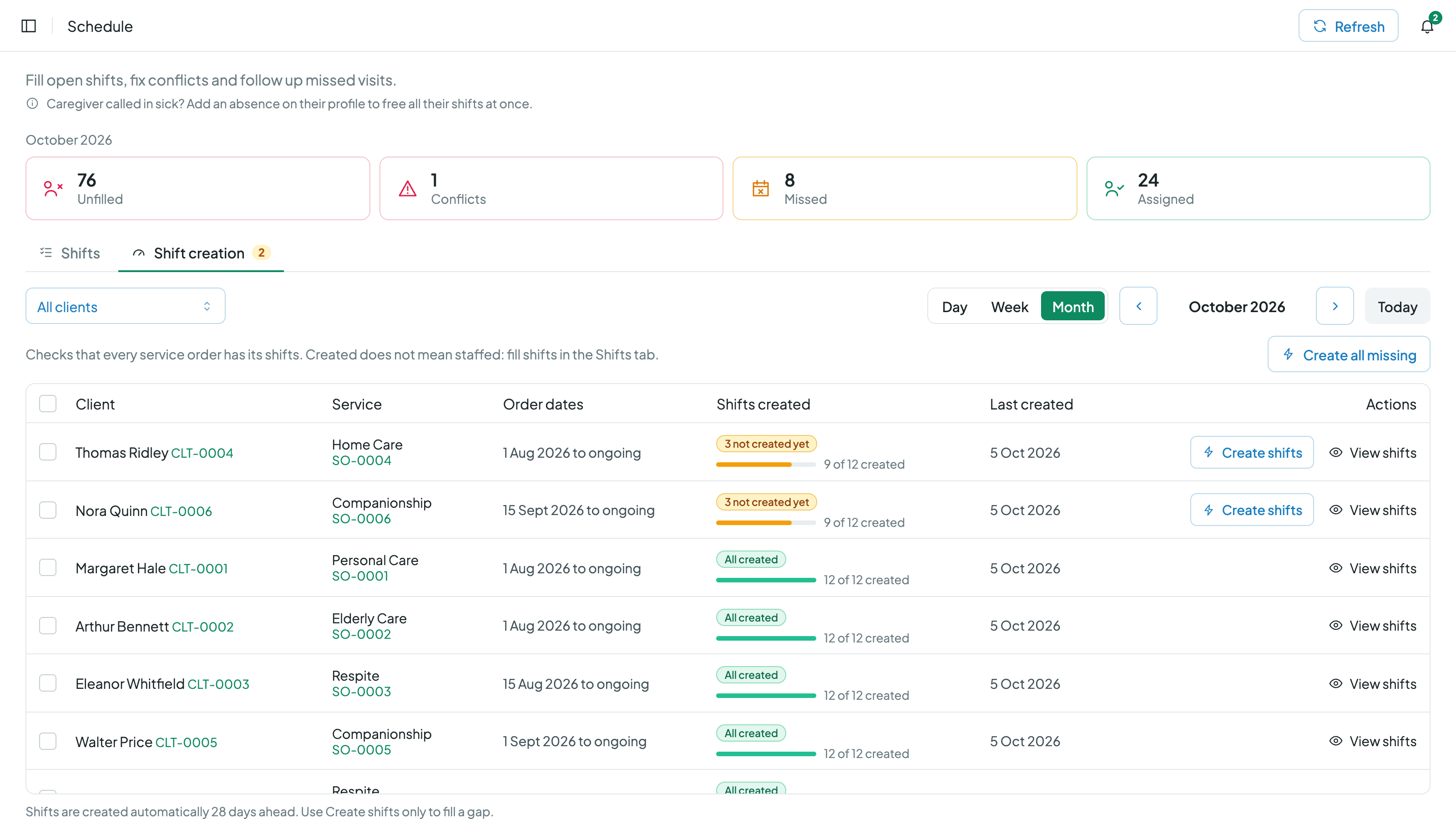
Shift creation: needed against created, order by order. Click to enlarge.
Shift creation
Check that every order has its shifts.
The Shift creation tab lists each service order with the shifts it needs and the shifts that exist for the dates in view. If anything is short, "Create all missing" fills the gap in one click.
Creating shifts never duplicates or changes the ones already there, so running it twice is always safe.
For the caregiver
Everything needed to get to the visit.
Assigned shifts show up in the caregiver app with the client's address, a button for directions, and the client's phone number ready to call. Visit instructions and notes from the office sit on the same screen.
More on what caregivers see is on the caregiver app page.
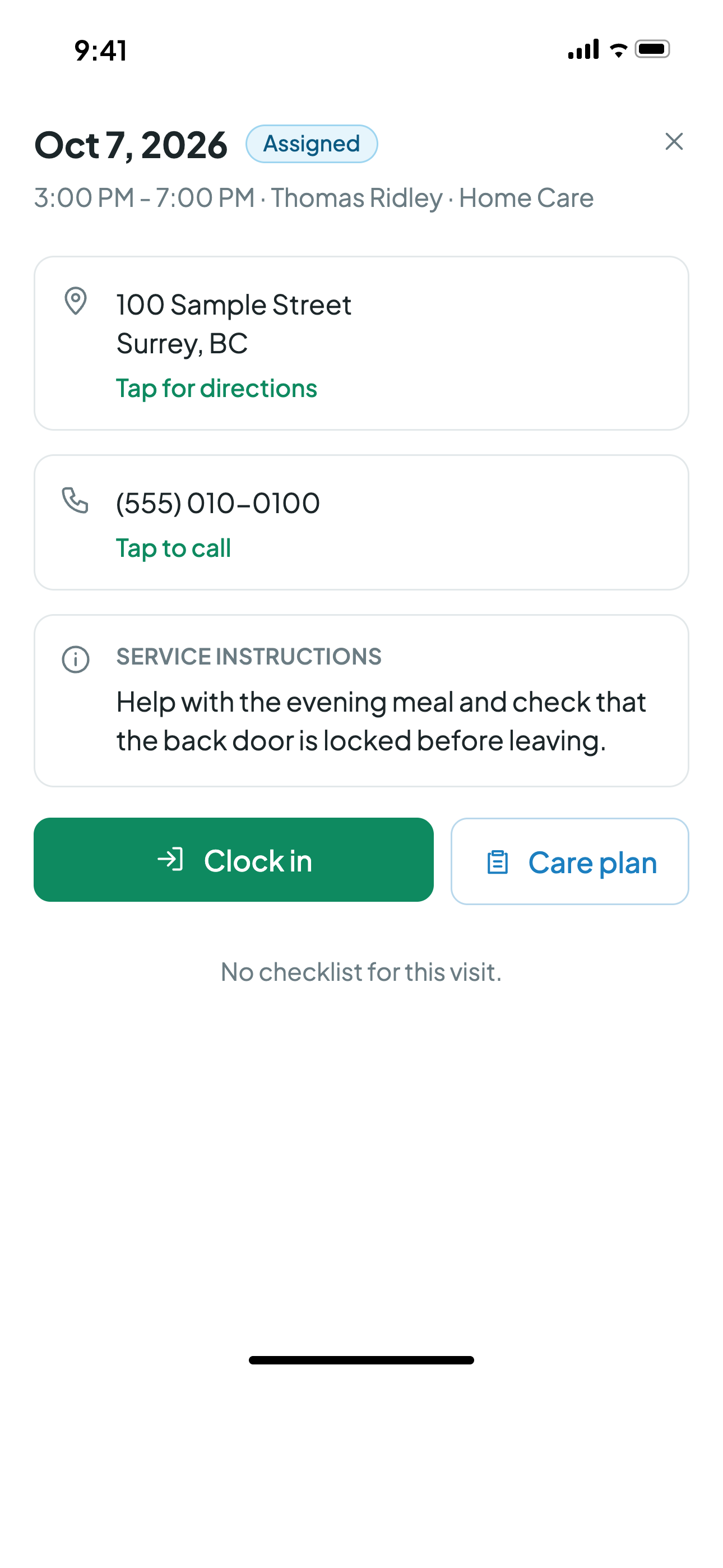
A shift in the caregiver app. Click to enlarge.
History you can stand on
The schedule never rewrites its past.
Patterns are never edited in place. Every change closes the old pattern and starts a new one, a suspension leaves a permanent gap record, and orders expire naturally on their end dates. The result is a schedule whose history holds up under any question: what was planned, when it changed, and who was assigned at every step.
Completed visits are protected everywhere. No schedule change and no edit can rewrite work that already happened, because that record is what clock-ins, billing, and payroll stand on.
Common scheduling questions.
Natively. A 10 PM to 10 AM shift is one shift, not two halves. Durations, conflict checks, monitoring, and every display understand shifts that cross midnight, and overnight rows carry a clear next-day marker.
Every assignment is checked against the caregiver's other shifts across all clients, overnight shifts included. If one still turns up, for example after a schedule change, the shift gets a red outline in every view and is counted on the Conflicts card. Clicking it opens the shift ready to resolve, and the conflict clears itself once the overlap is gone.
Yes. The By caregiver view lists every caregiver as a row with an hours column for the week or month in view, so you can see who has room and who is already carrying a full week before you assign anything.
They go on hold. When a client's service is interrupted, or a schedule is paused, the shifts in that window stay on the schedule as dashed violet cards so nothing is lost, but they are not counted as work and never turn into missed visits.
The old pattern is closed and a new one starts, so the history of what was scheduled is never rewritten. The new shifts are created as soon as you save. Completed visits are protected everywhere: no schedule change can touch the past.
Yes. Edit the time on that one shift from the list. The recurring schedule stays as it is, the caregiver keeps the shift and is told about the new time, and the double booking checks run again on the new window.
Yes, by design: each caregiver works under their own service order, so hours, rates, and authorizations stay separate. What Carelyst blocks is the accidental version, where duplicate patterns on the same order would collide.
Offer an unfilled shift to the caregivers you choose. The first one to accept gets it, the remaining offers withdraw themselves, and the schedule updates. No phone chain, no accidental double assignment.
Build next week's schedule this afternoon.
Start your 30-day free trialNo credit card to start · Cancel anytime