Start here
Carelyst walkthrough: scheduling, visit verification, billing and payroll
The full tour of the product, from building a schedule to caregivers clocking in with proof, visits verifying themselves, invoices going out and payroll being prepared. If you only watch one video before you talk to us, watch this one.

Prefer to read it? The same ground is covered on the how it works section of the home page, and in the scheduling, visit verification and billing pages.
A client asked us
The questions agencies actually ask, answered on screen
Each video in this series opens with a question an agency put to us, then answers it inside the product rather than on a slide. The written answer sits beside every video, so you can read it in twenty seconds or watch it in about a minute.

A caller wants weekday mornings starting next month. Can we even take them on?
Answer while they are still on the phone. The Find a caregiver page takes exactly what was asked: the weekdays, the time window, the care needs, no client record required yet. Every caregiver comes back ranked, each with a percentage showing how much of that schedule they can genuinely cover once their existing shifts, absences and unavailability are counted. Nobody free for all of it? A 60% and a complementary 40% on the same list is how a heavy case gets taken instead of declined, and every rank opens up to show its reasons.

Funding ran out for one care package. Can we pause just that one?
Yes, and the difference between the two levers matters. An interruption pauses everything for a client, while a suspension pauses a single order's schedule on its own: bounded, so it resumes automatically on the date you set, or open ended until you resume it yourself. The client's other package carries on untouched, and the paused schedule comes back exactly as it was designed, with its planned end date intact. The same lever covers staffing shortages, payment disputes, and pausing while you renegotiate the hours.

How do caregivers and families find out when something changes?
Both apps tell them the moment it happens. Assign a shift and the caregiver's phone knows about it; cancel one and they are told; change tomorrow's times and the caregiver and the family both get the new time. Families are included in all of it, which is the part most systems leave out: when only staff are notified, the family finds out because nobody arrived.

Our client is in hospital. How do we pause their care without wrecking the roster?
One record does it. Add a service interruption for the client, open ended when nobody knows the return date or bounded when you do, and every service for that client goes on hold at once. Caregivers and the family are notified together, and nothing is deleted: the shifts freeze in place, so an early return is one edit rather than a rebuild. If a thawed shift now collides with work the caregiver picked up in the meantime, Carelyst flags the conflict instead of double booking quietly.

Can we blast an open shift to our whole casual pool?
Yes. Broadcast the open shift, staff claim it from their own app, the first person to accept wins it, and every other pending offer withdraws itself. Offers also respect conflicts, so somebody already booked at that time never wins a shift they cannot work.

Our pay week runs Saturday to Friday. Can your software handle that?
Yes. The week start day is an agency setting: Saturday, Sunday or Monday, the three standards used around the world, and every calendar in the product follows it. It is not cosmetic either. Fortnightly rotas count their weeks from your week start, and the setting locks while live fortnight patterns exist, so nobody can quietly re-phase a roster you already built.
Attendance, close up
Two ways caregivers clock in, each shown end to end
Most agencies run on the phones their caregivers already carry. Some teams do not carry smartphones at all. Both are covered, and both feed the same visits, billing and payroll.
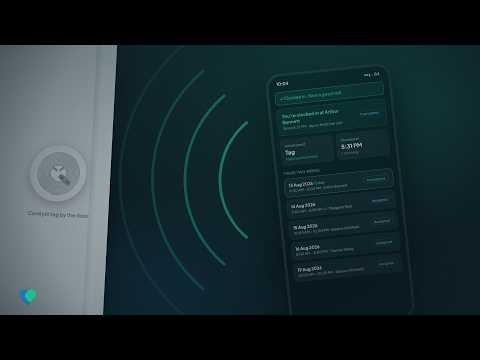
Clock in with a tap: visit verification with home tags
A tap sticker costing about ten cents sits at the client's door, and the caregiver's own phone reads it at clock in, which turns the punch into proof of being at the house. When a tag is missing or a phone cannot read it, the caregiver clocks in with GPS instead and the skipped tap is recorded with a reason.

Fingerprint attendance for caregivers without smartphones
One shared Android phone with a fingerprint scanner records the whole day for teams who do not carry smartphones, in the office and in the vans, and it keeps working with no signal. Those punches pair themselves into visits and feed the same billing and payroll as every other clock in.
New videos land on the Carelyst channel first
We record one every time the same question reaches us twice. Subscribing is the simplest way to catch them, and if your agency has a question we have not covered yet, tell us and it may well become the next video.
Ready to try it instead? See plans and pricing.